
 Icarvisions.com
TAGS: "Vehicle Cameras FAQ"
Get answers about vehicle surveillance cameras, including IP and AHD cameras, camera compatibility, connections, video quality, and camera selection for mobile DVR systems.
Below is the information associated with the tag "Vehicle Cameras FAQ"
-

JI-MC947 AI Passenger Counter Camera: 8 Key Features
Category: FAQ
This FAQ introduces eight core features of JI-MC947 AI Passenger Counter Camera for public transport. It covers performance advantages to support reliable passenger flow detection on buses and coaches.
-
DSM Camera Comparison: JA-MC938 and JA-MC921
Category: FAQ
This FAQ compares 'JA-MC938' and 'JA-MC921' in-vehicle DSM cameras, covering their key specs like installation, lens parameters, and features for driver status monitoring.
-
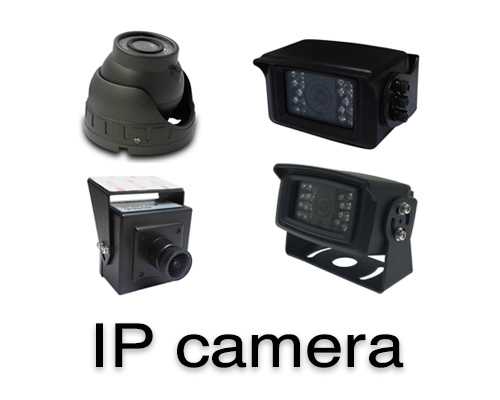
Which IP Cameras does ICARVISIONS supply?
Category: FAQ
This FAQ lists IP cameras supplied by ICARVISIONS, including models like JI-MC300, JI-MC609, and JI-MC510, with features such as high resolution, wide-angle views, and waterproof designs.
-
How to check the image dark corner problem
Category: FAQ
What this FAQ covers: A troubleshooting guide for MDVR image dark corner problem. It explains how to verify whether the issue stems from the AV-OUT display, the MDVR itself, or the camera by comparing video feeds across different viewing platforms.
-
Surveillance camera lens angle and distance calculation
Category: FAQ
What this FAQ covers: A technical reference for surveillance camera lens angle and distance calculation. It provides tables showing the relationship between lens focal length, CCD size, field of view, shooting range dimensions at different distances, and optimal distances for license plate recognition.
-
How to supply power to IP camera separately
Category: FAQ
What this FAQ covers: A troubleshooting guide to supply power to IP cameras separately from MDVR. It explains how to modify network cables to provide independent power, which helps resolve issues like failed camera detection, unstable video recording, and voltage fluctuations.
-
How to reset the password of IP camera
Category: FAQ
What this FAQ covers: A step-by-step guide to reset the password of an IP camera (e.g., JI-MC900). It explains how to use EasyTool to retrieve the camera's MAC address, generate a super password via EncodeMAC, and then log in to change the password through the camera's web interface.
-
How to fix the Passenger-Counting Camera display splash screen problem
Category: FAQ
What this FAQ covers: A troubleshooting guide to fix the splash screen issue on Passenger-Counting Camera displays. It explains how to adjust MDVR display settings, upgrade camera firmware, and reconnect internal cables to resolve display anomalies.
-
How to check if MDVR can not find RS485 of Passenger Counter
Category: FAQ
What this FAQ covers: A troubleshooting guide to resolve issues where MDVR cannot detect the RS485 port of a Passenger Counter. It explains how to check cable connections, serial port settings, firmware compatibility, and device address configurations to restore communication between MDVR and the counter.
-
Differentiate IO ports to implement Passenger Counter and Panic Button functions
Category: FAQ
What this FAQ covers: A technical guide to differentiate IO ports for Passenger Counter and Panic Button functions on MDVR devices. It explains how to connect sensor cables to the correct IO ports, configure port parameters, and set up wiring to enable both passenger counting and emergency alarm functions simultaneously.
-
How to config Dash IP Cam online by 4G
Category: FAQ
What this FAQ covers: A step-by-step guide to configure Dash IP Cam for online connectivity via 4G. It explains how to connect to the camera's built-in WiFi, access the web interface to set up 4G parameters, and verify the device's online status through the dedicated app to ensure stable 4G transmission.
-
How to upgrade firmware of Dash IP Cam
Category: FAQ
What this FAQ covers: A step-by-step guide to upgrade the firmware of Dash IP Cam devices. It explains how to prepare a FAT32-formatted SD card, load the firmware file, and perform the automatic upgrade by powering on the device, with steps to verify the new firmware version afterward.
-
The channel parameter introduction of Passenger Counter
Category: FAQ
What this FAQ covers: A detailed parameter guide for the Passenger Counter channel settings. It explains the purpose and recommended values for key parameters like sensitivity, filter height, counter type, and door delay, helping to optimize passenger counting accuracy.
-
How to update parameter of Passenger Counter camera
Category: FAQ
What this FAQ covers: A step-by-step guide to update the parameters of Passenger Counter cameras. It explains how to configure network settings, connect to the device via its default IP, log into the client, and apply the correct camera parameters to ensure accurate passenger counting.
-
How to export counts data from Passenger Counter
Category: FAQ
What this FAQ covers: A step-by-step guide to export passenger counting data from the Passenger Counter device. It explains how to configure network settings, connect to the device via its default IP, log into the client, and download the passenger in/out data for analysis and reporting.
-
How to change the camera parameters at MDVR side
Category: FAQ
What this FAQ covers: A practical guide to adjust camera parameters directly from the MDVR device. It explains how to use the remote control to access settings for hue, brightness, contrast, saturation, and sharpness, allowing real-time video quality optimization.
-
How to check Synchronize issue of camera audio and video
Category: FAQ
This FAQ guides users on checking and troubleshooting audio-video synchronization issues for MDVR camera systems, covering camera testing, audio configuration, and playback verification methods.
-
Why does Panice Button not appear in the Alarm Information list
Category: FAQ
What this FAQ covers: A troubleshooting guide to resolve the issue where the Panic Button does not appear in the Alarm Information list of IVMS systems. It explains how to identify conflicts with other devices like passenger counters, and how to reconfigure IO port settings to restore alarm visibility.
-
Camera image issue
Category: FAQ
What this FAQ covers: A troubleshooting guide to resolve camera image corruption issues on MDVR systems. It explains how to diagnose and address common causes including communication interference, hardware malfunctions, and firmware or board-related problems, ensuring clear and stable video output.
-
Search IP camera failed and can not get image
Category: FAQ
What this FAQ covers: A step-by-step troubleshooting guide to resolve issues where IP cameras cannot be detected or display images. It explains how to diagnose problems across network components including switches, fiber connections, cables, and the camera itself, ensuring full camera functionality is restored.





 Español
 português
 简体中文
简体中文 繁體中文
繁體中文 Deutsch
 Français
 日本語
日本語 한국어
한국어 بالعربية
 TÜRKÇE
 русский
 English